Introducing Slipway - The Complete Deployment Platform for Sails.js & The Boring JavaScript Stack

Kelvin Omereshone
@Dominus_Kelvin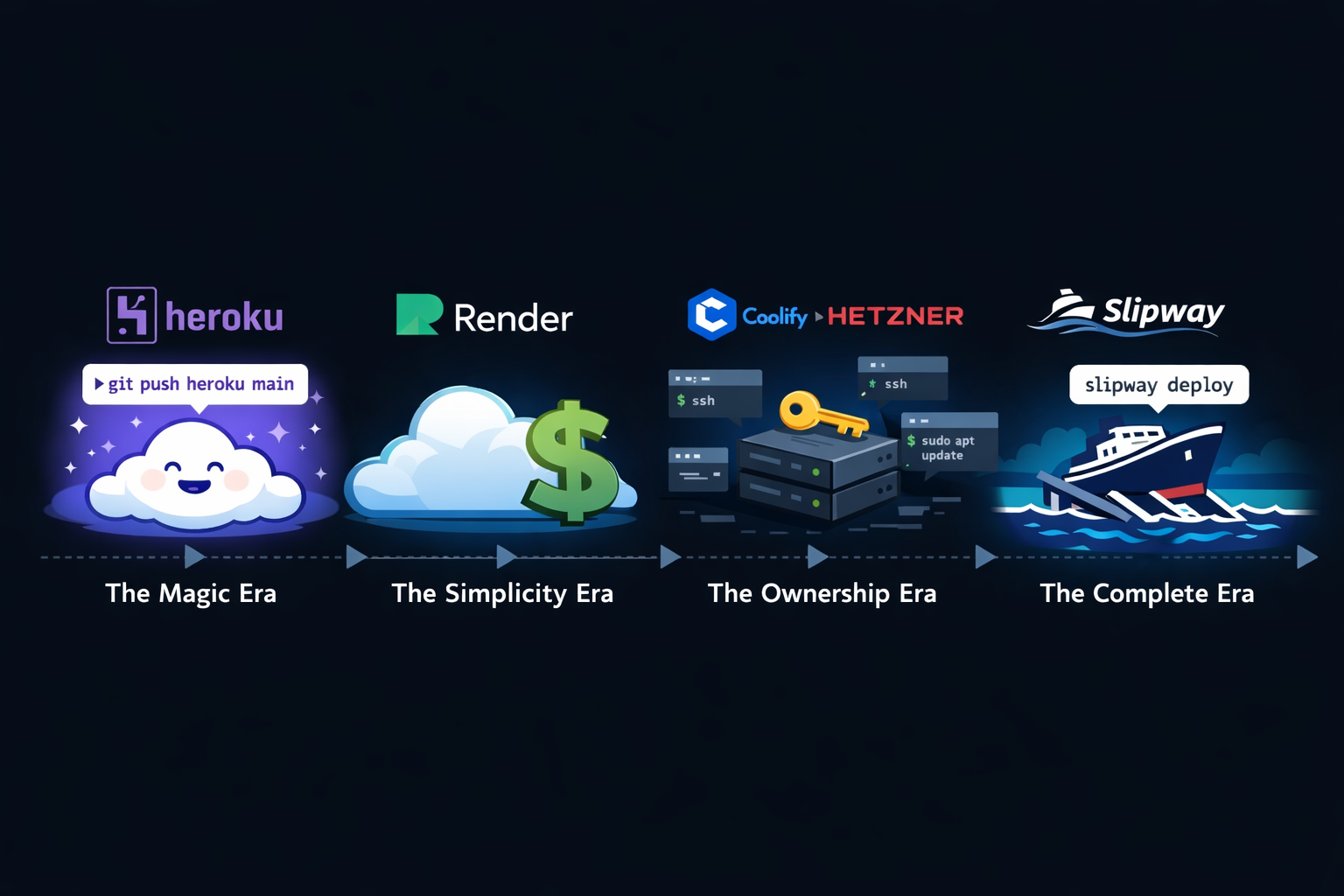
Before Heroku got expensive, it was magic.
git push heroku main and your app was live. No servers to configure, no Docker files to write, no infrastructure to think about. Heroku pioneered the idea that deploying should feel effortless - that the distance between your code and production should be one command.
They gave an entire generation of developers the gift of not having to care about ops. For a long time, nothing else came close.
Then the pricing changed. Free tier gone. Costs climbing. And like a lot of developers, I started looking for the next thing.
I moved to Render - and for a while, it was great. Render carried that same spirit of simplicity. I became a strong advocate for it. But as my apps grew, so did the bills. I was paying $83+/month for resources that felt increasingly constrained.
I wanted to own my infrastructure. No more surprise bills, no more pricing tiers, no more wondering where my data actually lives. So I made the jump - I moved all of my production apps to a Hetzner VPS running Coolify. A $22/month server with way more power than what I was paying for on Render. The economics were obvious.
But after running Coolify for a while, I wasn’t satisfied.
The Problem
Coolify is a great project offering for folk who want the feel of a PaaS. But it’s generic. It doesn’t know what a Sails app is. It doesn’t understand Waterline models, or Sails Quest jobs, or why you might want to run await User.find() against your production database at 2am when something breaks.
Here’s what my workflow looked like:
- Deploying: Coolify handled this fine, but it was a generic Docker deployment. No awareness of my Sails app structure.
- Database management: I’d SSH into the server,
docker execinto the PostgreSQL container, fumble around withpsqlcommands. Every. Single. Time. - Database migrations: This was the real pain. Waterline’s
migrate: alteris great in development but terrifying it is explicity turned off in production. I’d manually write ALTER TABLE statements, cross my fingers, and run them directly. No diff, no safety net, no history. - Debugging production: SSH, docker logs, grep. Repeat. No REPL, no way to inspect my running app without redeploying with extra logging.
- Admin panel: I had none. If I needed to edit a user record, it was raw SQL. Or I need a tool like Beekeeper which is just yet another tool that I have to reach out for
I was cobbling together five different workflows with SSH and hope.
Laravel developers have had Forge, Nova, Tinker, Horizon, and Pulse for years. Sails developers? We’ve been making do. I wanted us to have the same integrated experience.
Building Slipway
Thanks to AI-assisted coding, I was finally able to tackle something I’d been dreaming about for a long time. The scope of building a full deployment platform would have been overwhelming before - there’s Docker orchestration, reverse proxy configuration, SSL certificates, database provisioning, a web dashboard, a CLI, real-time deployment streaming, and more.
But with AI as a coding partner, I could move fast enough to actually ship it.
Today I’m thrilled to introduce Slipway - an open-source, self-hosted platform purpose-built for Sails.js and The Boring JavaScript Stack.
One command to install. One command to deploy.
What Slipway Does
One-Command Deploys
slipway slideThat’s it. slipway slide packages your source code, pushes it to your server, builds a Docker image from your Dockerfile, and performs a zero-downtime blue-green deployment. Your old container keeps serving traffic until the new one passes health checks, then Slipway switches the route and stops the old container.
Your users never see downtime.
Self-Hosted on Your VPS
Slipway runs on any Linux VPS you own. I recommend Hetzner Cloud - their CX22 plan (2 vCPU, 4GB RAM) is a perfect starting point and costs a fraction of what you’d pay on a PaaS.
Install with one command:
curl -fsSL https://raw.githubusercontent.com/sailscastshq/slipway/main/install.sh | bashThis sets up two containers - the Slipway dashboard and a Caddy reverse proxy - and gives you a URL to access your dashboard. The total memory footprint is about 120MB. Compare that to Coolify’s 800MB-1GB.
Automatic HTTPS
Slipway uses Caddy as its reverse proxy, which means SSL certificates are provisioned automatically via Let’s Encrypt. Point your domain to your server, and HTTPS just works. No certbot, no cron jobs, no renewal scripts.
Database Services
Create a PostgreSQL, MySQL, MongoDB, or Redis instance with one click from the dashboard (or slipway db:create from the CLI). The connection URL is automatically injected into your app’s environment variables. No manual DATABASE_URL configuration.
The Platform
This is where Slipway really diverges from generic deployment platforms. Slipway ships with a suite of integrated tools that understand your Sails app deeply. I probably would have not built Slipway if all I had to offer was just another open source PaaS you control for you to deploy generic apps in Docker containers.
Helm - Production REPL
Named after the ship’s helm. This is the feature I personally reach for the most.
Helm gives you a live REPL connected to your running Sails application, right from the browser. It works by executing code inside your running container - so you have full access to your models, helpers, and config.
// Query your production data
await User.find({ role: 'admin' })

// Run a helper
await sails.helpers.mail.send({ to: '[email protected]', subject: 'Test' })

// Check config
sails.config.custom.stripeKey
No more SSH + docker exec + node just to check why a user can’t log in. Open Helm, query the user, see what’s wrong, fix it. Done.
I built a desktop predecessor of Helm inspired by Tinkerwell and it only had access to your local codebase and wasn’t all that useful. Like Tinkerwell I wanted to go the route of sshing into your server but I believe Helm integrated into Slipway provides a better cohesive experience.
Bridge - Data Management
Named after the ship’s bridge. Bridge auto-generates a data management interface from your Waterline models. It introspects your running app, reads your model definitions, and gives you list views, create/edit forms, detail views, and bulk delete - all with proper field type mapping.
Think of it as Laravel Nova for Sails, but without writing a single line of configuration. It reads your models and just works.
Dock - Database Explorer
Named after the dock where ships are serviced. This one solves the database migration pain I mentioned earlier.
Dock gives you:
- SQL Console - Run queries directly against your production database from the browser. No more SSH + psql.
- Schema Viewer - See your table structures at a glance.
- Schema Diff - Compare your Waterline models against the actual database schema. Dock reads your models from the running container, queries
information_schema, and shows you exactly what’s different. - One-Click Migrations - Generate ALTER TABLE statements from the diff and apply them with one click.
This was the feature that made me most emotional building Slipway. If you’ve ever had to manually figure out what columns you added to a model and then write the corresponding ALTER TABLE for PostgreSQL in production - you know the pain. Dock eliminates it completely.
Quest - Job Dashboard
If your app uses Sails Quest for background jobs, Slipway automatically detects it during deployment and enables the Quest dashboard. View all your scheduled jobs, pause and resume them, trigger manual runs - all from the UI.
Content - CMS
If your app uses Sails Content, Slipway gives you a visual editor for your markdown content files. Browse collections, edit content with frontmatter management, and deploy changes. A built-in CMS.
Lookout - Monitoring
Install sails-hook-slipway in your app and Slipway automatically captures HTTP request traces, database query metrics, and exceptions. Monitor your app’s performance from the dashboard without configuring a separate observability tool.
Bosun - Self-Administration
The tools above all manage your apps. Bosun manages Slipway itself.
Named after the boatswain - the senior deckhand responsible for maintaining the ship. Bosun gives you system health stats, memory usage, database sizes, and an activity feed across all your projects. It has its own read-only SQL console for querying Slipway’s internal databases, and environment variable management for your Slipway instance.
The best part - Slipway can update itself. When a new version is available, Bosun pulls the latest image, spins up a temporary sidecar container, swaps the running Slipway container, and cleans up after itself. No SSH, no manual Docker commands. Your deployment platform deploys itself.
The Architecture
I made some deliberate technology choices building Slipway:
| Choice | Why |
|---|---|
| SQLite for Slipway’s own database | Zero-config, single-file backup, no separate database server to manage |
| Caddy over Nginx | Automatic HTTPS with zero configuration, Docker-native routing via labels |
| Docker | Universal container runtime, works on any Linux VPS, no vendor lock-in |
execFile() everywhere | Every Docker command uses execFile() instead of shell execution - no shell injection possible |
| Sails.js + Vue 3 + Inertia.js | Dogfooding the stack. Slipway is a Boring Stack app itself |
The security choice is one I’m particularly proud of. Every single interaction with Docker - building images, running containers, executing commands, reading logs - goes through Node’s execFile() which doesn’t spawn a shell. This makes command injection impossible by design, not by sanitization.
The CLI
The Slipway CLI is a zero-dependency Node.js tool. No npm packages. Just Node built-ins.
npm install -g slipway-cli

slipway login --server https://slipway.yourdomain.com
slipway init
slipway slide
That’s the complete workflow. login authenticates via your browser, init creates a project and saves a .slipway.json config file, and slide deploys. The CLI supports 27 commands covering deployments, environment variables, database services, backups, and more.
Deployment streaming is real-time - slipway slide watches your deployment via Server-Sent Events and shows live status updates as your app builds and deploys.
Backups
Slipway backs up your database services to S3-compatible storage (AWS S3, Cloudflare R2, DigitalOcean Spaces). It executes native dump commands inside the service container - pg_dump for PostgreSQL, mysqldump for MySQL, mongodump for MongoDB - and uploads to your configured bucket. One-click restore from the dashboard or slipway backup:restore from the CLI.
The Name
A slipway is a ramp that slopes into water, used for launching and maintaining ships. Ships are built on the slipway, slide into the water, and return for maintenance.
That maps perfectly to what the platform does - build your app, slide it into production, and maintain it once it’s running. Your Sails apps don’t just deploy - they slide smoothly into production. The deploy command slipway slide captures this perfectly.
The nautical theme runs through the entire Platform too.
Helm is where you steer your ship - so it’s your production REPL.
Bridge is the captain’s command center - so it’s your data management UI.
Dock is where ships are serviced - so it’s your database explorer.
Lookout is the crew member in the crow’s nest watching for danger - so it’s your monitoring dashboard.
Bosun is the senior deckhand who maintains the ship itself - so it’s your self-administration dashboard.
Every name ties back to what sailors actually do on a ship, and what you actually do with your Sails app.
Getting Started
Slipway is open source under the MIT license.
- Get a VPS - I recommend Hetzner Cloud for the best performance-to-price ratio and it just works for me.
- Install Slipway on your server -
curl -fsSL https://raw.githubusercontent.com/sailscastshq/slipway/main/install.sh | bash - Read the docs - docs.sailscasts.com/slipway
- Star the repo - github.com/sailscastshq/slipway
Slipway is designed to be self-serve, but if you want help getting set up or just want to talk through the move before committing, reach out to me at [email protected].
What’s Next
Slipway is at version 0.0.x. It’s the MVP - but it’s an MVP that is Simple Loveable and Complete. I moved sailscasts.com, hagfish.app, and, africanengineer.com in production every day for my own apps. The core deployment pipeline, the Platform features, database services, backups, and the CLI are all working and real-world tested.
There’s a lot more coming - deploy tokens for CI/CD pipelines, audit logs in the dashboard, and deeper integrations across the Platform. But the foundation is solid and I wanted to get this into your hands now.
If you’re building with Sails.js or The Boring JavaScript Stack and you’ve been wishing for a deployment experience that actually understands your framework and stack - Slipway is for you.
I want to thank Heroku, Render, and Coolify. Each one raised my taste for what a good deployment platform should be.
Heroku showed me that deploying should feel like magic. Render showed me that simplicity could survive Heroku’s decline.
Coolify showed me that owning your infrastructure was possible without a DevOps team. Slipway wouldn’t exist without the bar they set.
Here’s to sliding Sails and The Boring JavaScript Stack apps into production. The boring way.